Having trouble with your grant application? Here's a step by step guide to using our online portal.

Getting Started
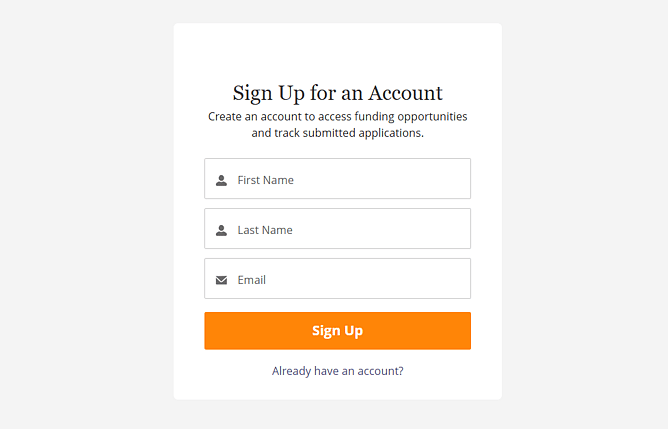
We use a dedicated grant application portal run through the Salesforce platform for our grants applications. If you haven't applied for funding through us before, you'll need to sign up for an account by entering your name and email address.
If you have applied with us before you likely already have an account. Click "Already have an account?" below the orange sign up button and enter your details.
If you get an error message ("invalid email" or something similar) when you try to sign up it's likely you already have an account.
Once you've successfully signed in, you'll land on our portal home page.
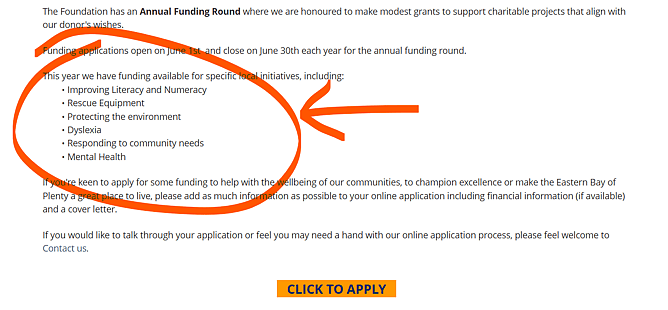
Check that your funding request fits under one of the areas listed
Click the orange "click to apply" button
On the next page click the orange "apply" button
Click "next" to start your application
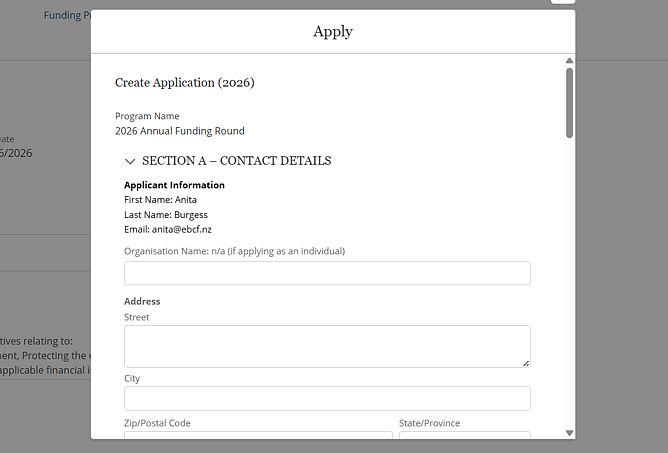
Now you should see a form that looks like the image below.
You'll need the following to be able to complete your application:
Contact number
Registered charity or registration number (if applicable)
GST number
The amount you're applying for
Your organisation's bank account details
Uploading documents
Once you've completed the form, you'll need to click "next" twice to get through to the document upload stage.
To support your application, we highly recommend you upload the following documents:
Cover letter
Proof of bank account
Any other supporting financial information (budget, quotes, annual accounts, etc)
If you don't have your documents ready to upload, click "next". This will save your application as a draft which you are then able to come back and edit or upload additional documents.
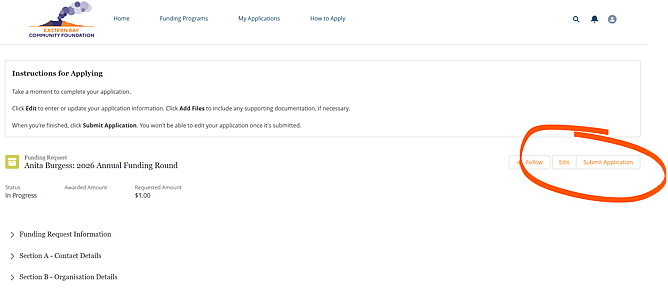
Once you're happy with your draft application, make sure you click "submit application" on the summary page.
What happens next...
Once you've submitted your application successfully you'll receive an email confirmation.
If we need any further information regarding your application or your project, we may get in touch with you.
Once the application period has closed, our Grants and Distributions team will go through all of the applications to make their decisions.
We'll be in touch to let you know if you've been successful or not within approximately six weeks of the close date.